Stop cehckign typo in your email campaigns. This is how ChatGPT peer-reviews every single word automatically. (Braze, + others)

If there’s one thing I’ve noticed in every company, it’s that the peer review process is the most frustrating part. After creating the editorial plan, managing the copy, and setting up the email that needs to go out on Friday at 7:35 PM, checking the campaign in 40 different languages is the last thing you want to do. I feel the pain of all the CRM managers out there, so I thought of finding a solution to automatically check the emails we send to ensure the correct language is displayed and there are no grammatical errors. (Yes, the typo at the top is intentional.)
The Problem
Centralized teams and solo managers struggle to proofread their emails efficiently. Managers often rely on peers or localization teams to review emails before sending, which slows down workflows and adds unnecessary tasks for multiple people. When mistakes are found, the CRM Manager must revise the email and request another round of peer review, doubling the effort for everyone involved.
The opportunity
Considering the effort involved, we can estimate 15 minutes of work per email (best case scenario) for each of the 24 localization managers (one per language in Europe), plus 1 hour of coordination time. This brings the total time saved to approximately 5.5 hours per email.
With an estimated gross salary of €40,000 per year, the cost savings per email would be around €135.
Assuming three email per week, this translates to an annual savings of approximately €21,000.
My Hack
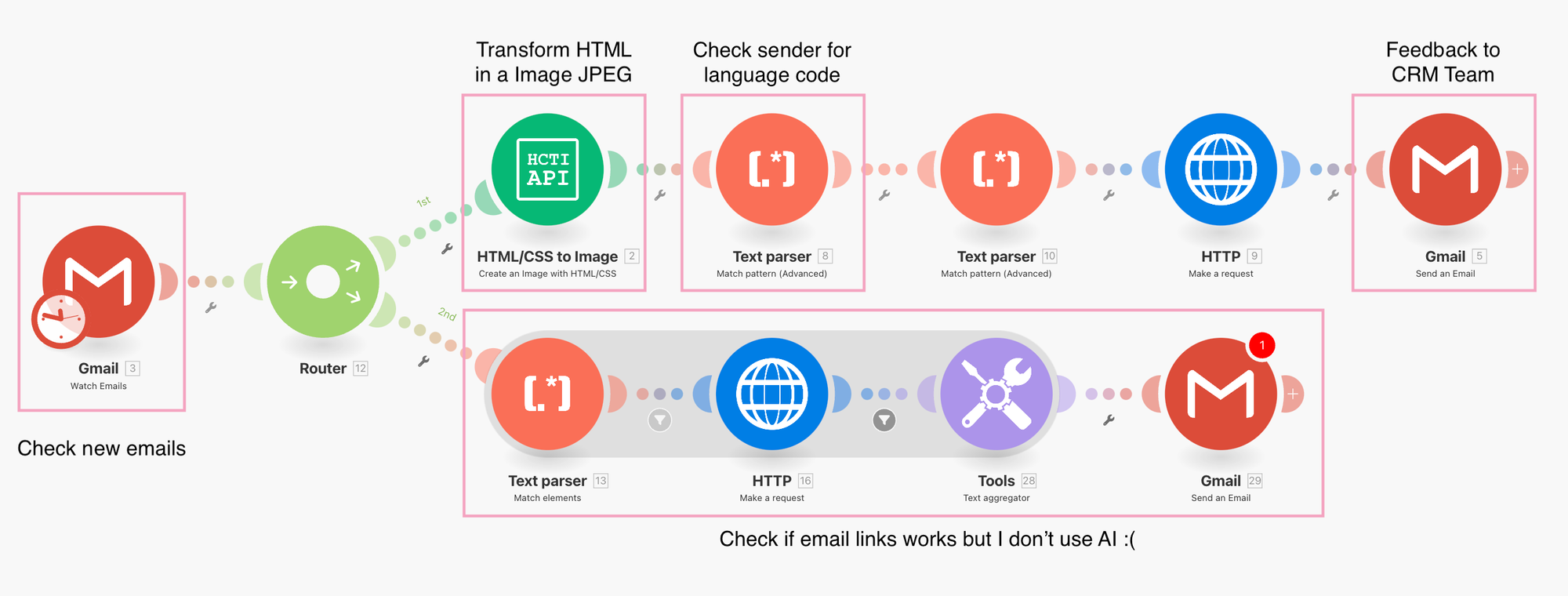
I used Make.com to automate the email review process using three tools: an email provider, an HTML-to-image converter (https://htmlcsstoimage.com/), and a feedback system to communicate errors back to the team. For this MVP, all feedback is handled via email.
How It Works
0) Create email inbox
First, create an email inbox to receive test emails. For example, testemail@martechdude.com will serve as the inbox for all our test emails.
0.1) Create test profiles
Next, set up test profiles in your marketing platform. If your company uses a catalog-based method for translating emails, create a test profile for each language code used.
The Trick: Use a consistent naming convention for test profiles. The email addresses should follow this format: testemail+languagecode@martechdude.com (e.g., testemail+en_GB@martechdude.com).
Why?
Email providers allow you to add "+something" after your main address, which still routes emails to the same inbox. This lets you manage all test emails in one place, simplifying integration. When ChatGPT checks the email content, it can use the language code in the recipient's address to verify if the correct language is displayed. For example, if testemail+en_GB@martechdude.com receives an email in French, we know something is wrong.
1) Send a test emails
Send test emails to the inbox, such as testemail+en_GB@martechdude.com. Based on the address, we expect the email to be in British English (en_GB).
2) HTML to Image
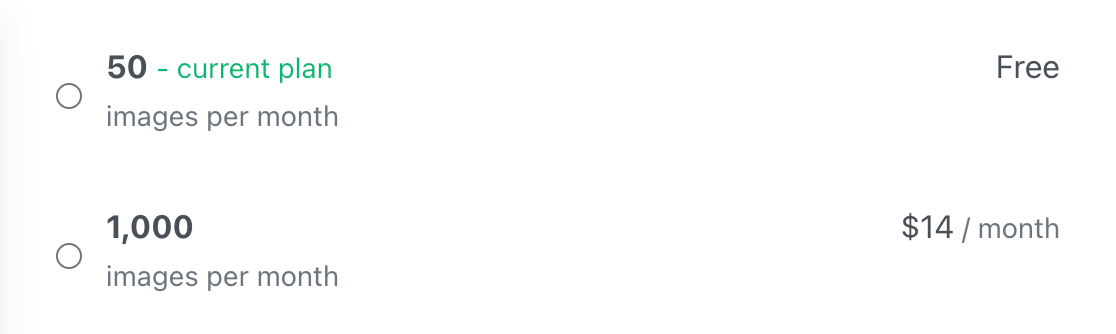
Nothing fancy here. I use an API to get the image.jpeg of the email I send to the customers. In this example I used https://htmlcsstoimage.com/
2) Extract language code from recipient.
To keep the system scalable and low-maintenance, use a simple regex to extract the language code (e.g., en_GB) from the recipient's email address (testemail+en_GB@martechdude.com).
3) Chatgpt check the image
Upload the email image to ChatGPT and ask it to identify typos or grammatical errors.
Example API request:
{
  "model": "gpt-4o",
  "messages": [
    {
      "role": "user",
      "content": [
        {
          "type": "image_url",
          "image_url": {
            "url": "{{URL}}"  <--- URL OF THE IMAGE YOU GENERATED
          }
        },
        {
          "type": "text",
          "text": "[EMAIL_SUBJECT: {{EMAIL SUBJECT}}"
        },
        {
          "type": "text",
          "text": "You are a proofreader that speaks {{language_code}} language code that is able to read text, read single words and looking for typos. This email contains a screenshot of an email campaign for customers who can read {{language_code}} language code. You have to check for language typos in the uploaded images, in EMAIL_SUBJECT and PREHEADER. Once you check the text you have to list all the typos or grammatical error you found and you give your suggestion how would you improve it. You don't give any advice here if is not grammatical uncorrect"
        }
      ]
    }
  ],
  "max_tokens": 300
}
Example API request:
Response
"content": "Here are the typos I found:\n\n1.

**EMAIL_SUBJECT:** \"Welconem on board\" should be \"Welcome on board.\"\n\n2.

**Main Body Text:**Typo:** \"frst-hand\" should be \"first-hand.\"\n\n3.
4) The response goes back to the team
Now you have to give back the info to one of your team channel. I think is better to have a dedicated channel on slack/teams to receive this info, but for this MVP is preferred use the email to get the feedback back.
Let’s Chat
I hope you enjoyed the article and got some useful ideas for your own implementation!
Remember, this is just an MVP, and there’s plenty of room to make it better. Let me know your thoughts—I’m curious to hear how you’d approach it!